SQL Morph
Your SQL logic. Your platform rules. Generated together.
Turn SQL specifications and datastore metadata into implementation artifacts with reusable templates. Keep transformation logic readable, centralize naming and integration conventions, and generate SQL and supporting files from the same specification.
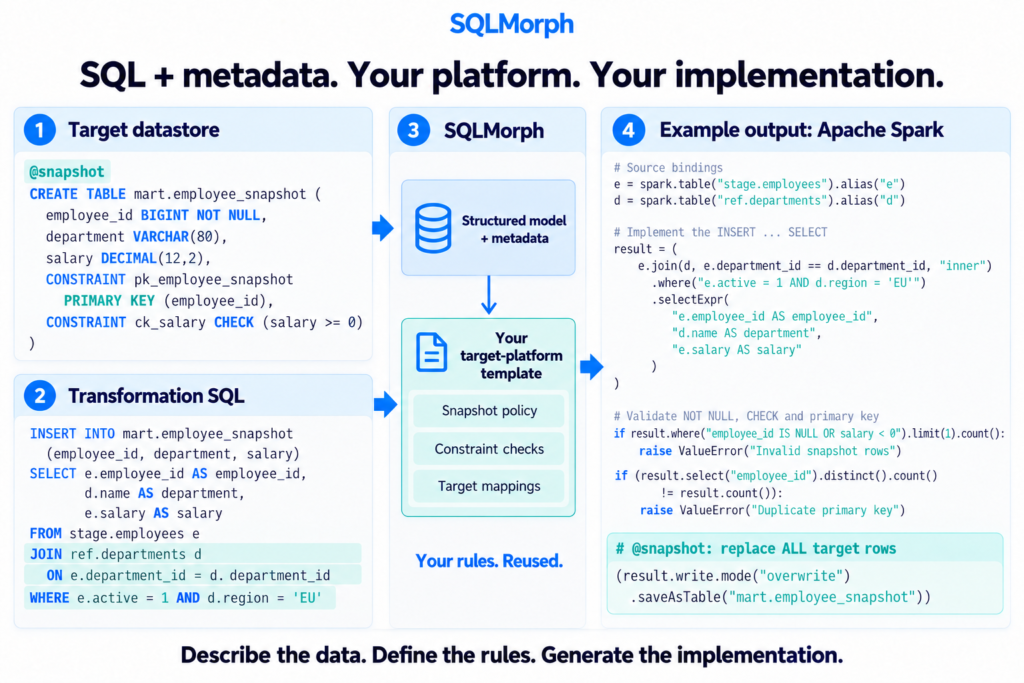
Write the transformation. Reuse the implementation rules.
Data pipelines repeat physical naming rules, technical fields, upsert conventions, and orchestration setup. When those rules are copied into every pipeline, changing a convention means maintaining many files.
SQL Morph gives those rules a reusable home. Its Java framework, Structured SQL API, parses SQL specifications into a structured model, resolves datastore metadata, and exposes that model to templates you control.
Beyond code generation: generate and deploy native ODI objects
Generating a data pipeline means understanding the platform it will run on: its objects, relationships, and implementation conventions. SQL Morph also has a separate extension that uses the Oracle Data Integrator SDK to generate mappings, datastores, packages, and scenarios. The extension can also be used to deploy these objects.
This brings reusable implementation rules into the creation and deployment of native ODI objects, supporting automation across a broader part of the integration delivery process.
The ODI SDK extension is a separate component and is not currently included in the public GitHub repository. Building and running it requires the ODI SDK and its dependencies.
Interested in automating ODI object generation and deployment? Contact me at adi.neagu@gmail.com to discuss the extension and your ODI environment.
Applied in banking. Across technology generations.
SQL Morph has supported large-scale data integration projects at a leading Austrian bank and a major Romanian bank, addressing platform migration and ETL development automation across large numbers of jobs.
A leading Austrian bank — Supporting successive migrations
The tool was first used to support migration from a DB2 and COBOL mainframe implementation to Oracle and Oracle Data Integrator (ODI). It was subsequently applied to Oracle-to-Hadoop data replication and analytics, and later to an Oracle-to-BigQuery migration. Reusable generation rules helped apply consistent implementation patterns across large numbers of jobs.
A major Romanian bank — Modernizing ETL development
The focus was on modernizing and automating ETL development, using reusable generation templates to capture shared implementation patterns and support a repeatable development process.
One employee mapping. Two generated artifacts.
Start with the business assignments between two logical tables:
INSERT INTO prep.employees (
    EMPLOYEE_ID, DEPARTMENT_ID, SALARY
)
SELECT
    e.EMPLOYEE_ID AS EMPLOYEE_ID,
    e.DEPARTMENT_ID AS DEPARTMENT_ID,
    e.SALARY AS SALARY
FROM stage.employees e
This excerpt shows the business SQL. The complete specification also includes annotations for MERGE mode and Airflow settings. Datastore definitions supply columns, types, and the target primary key.
SQL mapping + datastore metadata
                |
     Airflow/BigQuery template package
                |
       +--------+--------+
       |                 |
  MERGE script       Airflow DAG
     (.sql)             (.py)
BigQuery MERGE SQL
The target primary key drives matching. A shared template policy supplies technical-field values and determines which fields insert or update. The generated script begins:
MERGE `example-project.prep.employees` AS T
USING (
    SELECT
        e.EMPLOYEE_ID AS EMPLOYEE_ID,
        e.DEPARTMENT_ID AS DEPARTMENT_ID,
        e.SALARY AS SALARY
    FROM `example-project.stage.employees` e
) AS S
ON T.EMPLOYEE_ID = S.EMPLOYEE_ID
The full script adds update and insert branches, with typed parameters for the load ID and effective date.
An Airflow DAG
The same package generates a Python DAG that submits the SQL with typed BigQuery parameter bindings. Both files come from one mapping and shared template policy.
Follow the complete example: inputs, templates, commands, and reference outputs →
Keep each rule where it belongs
SQL defines the business assignments. Keep the transformation visible in a readable specification.
Metadata supplies structure and keys. Resolve logical table references to datastore definitions that templates can inspect.
Templates define platform conventions. Reuse physical naming, technical-field expressions, write rules, and artifact structure across mappings.
Template packages can generate multiple files and use Velocity, Pebble, FreeMarker, or Jinjava. The public repository also includes structured SQL rendering and a text-generation example for an ODI mapping strategy. The separate ODI SDK extension supports generation and deployment of native ODI objects.
Developing SQL Morph with AI coding agents
I develop SQL Morph with AI coding agents, using application feedback to improve both the framework and the guidance that agents need to use it.
In a practical experiment, a separate Codex agent worked in an application project without access to SQL Morph’s implementation source code. Its task was to turn Excel datastore descriptions into SQL specifications, add meaningful annotations, develop Oracle cleansing and constraint-validation templates, and generate the resulting code. The experiment succeeded with interactive guidance, revealing where the documentation needed to be clearer.
That feedback led to a clearer public-API workflow, executable training examples, and a stronger SQL-first modelling rule: declare structure and constraints in SQL, then use annotations for additional template policy. It also exposed a runtime bug in CHECK-constraint metadata construction. We fixed the bug and added regression tests for CHECKs with and without annotations.
The aim is to make each application experiment improve the next agent’s starting point. The Oracle training example is checked against expected generated artifacts; execution in an Oracle database remains a separate validation step.
Read the coding-agent guide · Explore the Oracle training workflow
Try it locally
With JDK 21 and Maven, run this from a local checkout of the repository:
mvn compile exec:java "-Dexec.args=examples/airflow-bigquery-draft"At the sqlm> prompt, enter:
apply airflow_bigquery to mapping employees_to_prep
exit
The package writes the SQL and Python files under the example project’s generated/airflow_bigquery/employees_to_prep/ directory.
Public repository scope: the framework generates files; execution and deployment belong to the target systems. The Airflow/BigQuery example implements a scoped upsert strategy. Generated SQL and Python are checked against regression fixtures, but have not been runtime-tested in Airflow or BigQuery. The separate ODI SDK extension is not included.